
A year ago this question had an easy answer. Google's Nano Banana had just gone viral, and it was the AI photo editor everyone tried first. In 2026 the lead has changed hands twice. OpenAI's GPT Image 2 took the top spot on every Arena image leaderboard in April, and on September 8 OpenAI followed up with ChatGPT Images 2.5. Google, meanwhile, made Nano Banana 2 the default model in the Gemini app in February and added an even faster Lite model at the end of June.
So which one should you actually use to edit your photos? This ChatGPT vs Gemini photo editing comparison looks at four kinds of evidence: blind human votes, price, speed, and features. Then it gives you four ready-to-run prompts so you can test both tools on the same photos and publish the results side by side.
The short answer
On edit quality, ChatGPT is ahead in 2026, and the gap is large by leaderboard standards. On free usage, entry price, and integration with the rest of your digital life, Gemini is the better deal. Most people will be happy with either; the right pick depends on whether you care more about the last 10% of quality or about cost and convenience.
ChatGPT wins on Precise edits that leave the rest of the photo untouched, keeping people recognizable, text inside images, and overall blind-vote preference in both editing and generation. | Gemini wins on The cheapest paid plan, real-world accuracy through Google Search grounding, multilingual text in images, and fitting into Android, Google Photos, and Search. |
| Category | Edge | The number behind it |
|---|---|---|
| Editing quality (blind votes) | ChatGPT | Top Single Image Edit score of 1,522 vs Google's best of 1,390 on Arena |
| Default model vs default model | ChatGPT | GPT-Image-2.5 Flare at 1,478 vs Nano Banana 2 at 1,387, a 91-point gap |
| Generating new images | ChatGPT | Text-to-Image score of 1,424 vs 1,261 for Google's highest-ranked model |
| Cheapest paid plan | Gemini | Google AI Plus at $4.99 a month vs ChatGPT Go at $8 |
| API cost per image | Depends | About $0.013 (OpenAI medium) to $0.053 (OpenAI high) vs $0.067 for Nano Banana 2 at 1K |
| Speed of default models | Tie | About 13.6 seconds (Flare) vs about 13 seconds (Nano Banana 2) in third-party tests |
| Real-world accuracy | Gemini | Nano Banana 2 can pull reference images from Google web and image search |
What powers each tool in 2026
Neither chatbot edits photos by itself. Each one hands the job to a dedicated image model, and those models have changed several times in the past twelve months. Here is what you get today when you upload a photo and type an instruction.
ChatGPT: Images 2.5Released September 8, 2026 to every ChatGPT plan, including Free. OpenAI says it preserves subjects from reference photos better, follows editing instructions more reliably over multiple turns, and cuts generation latency by up to 50% compared with Images 2.0. In early hands-on testing, Axios found the new engine faster and much better at keeping people and pets looking like themselves. New tools arrived with it: Sketch lets you draw a rough idea as a reference, you can place comments directly on an image for focused edits, and templates cover formats like posters and product photos. Developers get two API versions: GPT-Image-2.5 Flare, the fast default, and GPT-Image-2.5 Sunburst, which trades speed for extra precision. Scale is enormous. OpenAI says people create more than 3 billion images every week across ChatGPT and its API. | Gemini: Nano Banana 2Officially Gemini 3.1 Flash Image, launched February 26, 2026. It replaced Nano Banana Pro as the default in the Gemini app's Fast, Thinking, and Pro modes, and paid subscribers can still redo an image with Nano Banana Pro when they want more detail. Ars Technica's launch coverage summed up Google's pitch as Pro-level results at Flash speed. Its standout trick is grounding: it can use Google web and image search to render real subjects more accurately. Google says it keeps up to five characters consistent and handles up to 14 objects in one workflow. The Mark up tool lets you circle an area or write a note directly on the photo. On June 30, Google added Nano Banana 2 Lite, its fastest and cheapest image model, which can return an image in as little as four seconds. |
Twelve months of leapfrogging
August 2025
Nano Banana (Gemini 2.5 Flash Image) appears anonymously on Arena, then goes viral inside the Gemini app.
November 2025
Nano Banana Pro (Gemini 3 Pro Image) adds higher detail and better text rendering.
December 16, 2025
GPT Image 1.5 powers the new ChatGPT Images, with more precise edits and up to 4x faster output.
February 26, 2026
Nano Banana 2 becomes the default image model in the Gemini app, Search, and Flow.
April 21, 2026
GPT Image 2 takes first place on every Arena image leaderboard, with a record 242-point lead in text-to-image.
June 30, 2026
Nano Banana 2 Lite arrives as Google's fastest, cheapest image model.
September 8, 2026
ChatGPT Images 2.5 ships, with Flare and Sunburst in the API.
What blind voters prefer
The most useful public data on photo editing quality comes from Arena (formerly LMArena). A user uploads a photo and an instruction, two anonymous models return edits, and the user votes for the better one. As of September 29, 2026, its Single Image Edit board had collected 30.8 million votes across 57 models. These are the scores for every OpenAI and Google model relevant to this comparison.
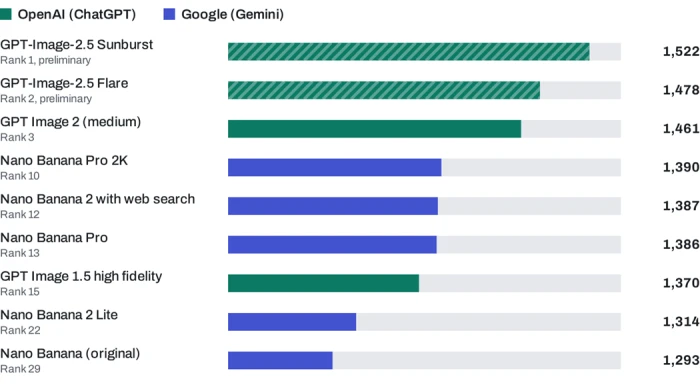
Arena Single Image Edit leaderboard, snapshot of September 29, 2026. The scale starts at 1,200 so the gaps are visible. Striped bars are flagged preliminary because they have fewer votes.
~63%
Using the standard Elo formula, the 91-point gap between GPT-Image-2.5 Flare (1,478) and Nano Banana 2 (1,387) means voters would be expected to prefer the ChatGPT edit about 63% of the time. The 132-point gap between the two flagships, Sunburst and Nano Banana Pro 2K, implies about 68%.
Two caveats are worth knowing. First, OpenAI's 2.5 models have roughly 45,000 to 47,000 votes each, while Nano Banana Pro 2K has more than 638,000, so the newest scores could move a few points. Even so, the gap is many times wider than the confidence intervals of plus or minus 3 to 5 points. Second, Google's original Nano Banana holds 11.36 million votes on this board, more than any other model, and now ranks 29th. That is a reminder of how quickly a leader can slide in this market.
The picture is the same for creating images from scratch. On Arena's Text-to-Image board (snapshot of September 24, 2026), OpenAI's models take the top three places.
| Text-to-Image rank | Model | Score |
|---|---|---|
| 1 | GPT-Image-2.5 Sunburst | 1,424 |
| 2 | GPT-Image-2.5 Flare | 1,401 |
| 3 | GPT Image 2 (medium) | 1,383 |
| 9 | Nano Banana 2 with web search | 1,261 |
| 13 | Nano Banana 2 Lite | 1,250 |
| 14 | Nano Banana Pro 2K | 1,247 |
What it costs to edit more photos
Both tools let you edit photos for free, and both sell monthly plans that raise your limits. Gemini's ladder starts lower.
| Tier | ■ ChatGPT | ■ Gemini |
|---|---|---|
| Free | $0, limited and slower image generation | $0, image generation and editing included |
| Entry | Go, $8 a month, roughly 10x Free's image allowance | Google AI Plus, $4.99 a month, 2x Free's usage |
| Standard | Plus, $20 a month | Google AI Pro, $19.99 a month, 4x Free's usage |
| Power | Pro, $100 or $200 a month | Google AI Ultra, $99.99 (5x Pro) or $199.99 (20x Pro) |
Exact image caps are harder to pin down, because neither company publishes a fixed number anymore. OpenAI describes Free image generation only as limited, and independent trackers report that free users typically get around 2 to 3 images a day. Google's plan page now describes compute-based limits that refresh every five hours up to a weekly cap. Earlier in the year, in March 2026, Google's help table listed up to 20 Nano Banana 2 images a day on the free tier, 50 on AI Plus, 100 on AI Pro, and 1,000 on AI Ultra. These caps move with demand: in late 2025, Google cut free Nano Banana Pro use from three images a day to two. Either way, Gemini has historically been the more generous free option.
API prices, for developers and heavy users
If you edit at volume through an API, the math flips depending on quality. OpenAI bills GPT-Image-2.5 by tokens: $5 per million text-input tokens, $8 per million image-input tokens, and $30 per million image-output tokens, with Flare and Sunburst priced identically. Google prices Nano Banana 2 at $60 per million image-output tokens, which works out to a flat cost per image by resolution, with a 50% discount for batch jobs.
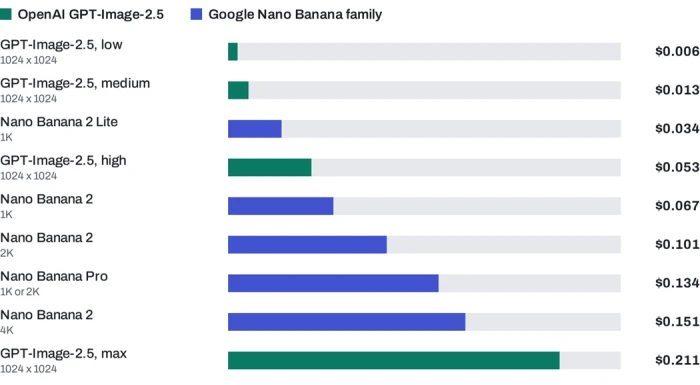
Approximate output cost per image in USD. OpenAI figures are output-token estimates at 1024 x 1024 from third-party calculators; an edit also adds image-input tokens for the photo you upload. Google figures are from its official Gemini API price list at standard (non-batch) rates.
How long you wait
Speed used to be Google's clear advantage. With Images 2.5, OpenAI says it cut latency by up to half, and independent tests now put the two default models in the same range.
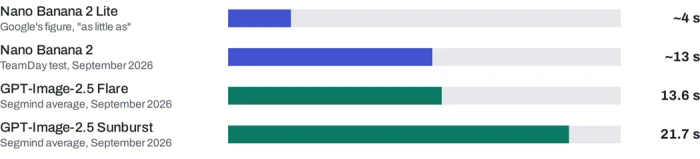
Seconds per image through the API. In the apps, wait times also depend on your plan, server load, and how complex the edit is. Google notes that editing can take slightly longer than generating.
The practical takeaway: for everyday edits the wait is a wash. If you need dozens of quick drafts, Nano Banana 2 Lite is in a speed class of its own. If you want the most careful result, Sunburst asks you to wait about 60% longer than Flare.
Feature by feature
| Feature | ChatGPT (Images 2.5) | Gemini (Nano Banana 2) |
|---|---|---|
| Point at what to change | Place comments directly on an image; Sketch for drawn references | Mark up tool: circle, sketch, or type notes on the photo |
| Keeping people looking like themselves | A headline focus of the 2.5 release, for people and pets | Up to 5 consistent characters and 14 objects per workflow |
| Multi-step editing | Built to hold earlier changes steady across many turns | Conversational editing that keeps context between prompts |
| Real-world accuracy | More accurate real-world content, per OpenAI | Grounded in Google web and image search |
| Text inside images | Complex layouts, transparent backgrounds | Multilingual text and in-image translation |
| Higher-quality fallback | Sunburst in the API | Redo with Nano Banana Pro on paid plans |
| Max resolution via API | Up to 4K | 0.5K to 4K |
| AI labeling | C2PA metadata and an invisible watermark | SynthID invisible watermark, C2PA compatible |
| Where else it lives | Codex, ChatGPT Work, and inside Adobe Firefly | Google Search (AI Mode and Lens), Flow, Google Photos context |
Same prompt, both tools: four photo-editing tests
Leaderboards average millions of votes, but you care about your own photos. These four prompts each target a different editing skill. Run each one, word for word, in both ChatGPT and Gemini, then drop the results into the frames below to compare them side by side.
How to run a fair test 1. Use the exact same source photo for both tools. 2. Start a fresh chat in each tool and keep the default image model. 3. Paste the prompt exactly as written. Take the first result, with no follow-up fixes. 4. Time each result from pressing enter to seeing the image. 5. Score each result from 1 to 5 on the four criteria in its scorecard. |
Remove the crowd
What it tests: precise object removal and whether the tool rebuilds the background believably without touching the person you kept. Best source photo: one person in front of a landmark or street, with strangers and cars behind them.
| Prompt 1 |
| Remove all the people and parked cars from the background of this photo. Keep the main person in the foreground exactly as they are: same face, pose, clothing, and expression. Rebuild the areas behind the removed objects so the street, pavement, and building walls continue naturally, matching the original lighting, shadows, perspective, and grain. Do not change the framing, the colors, or anything else in the image. |

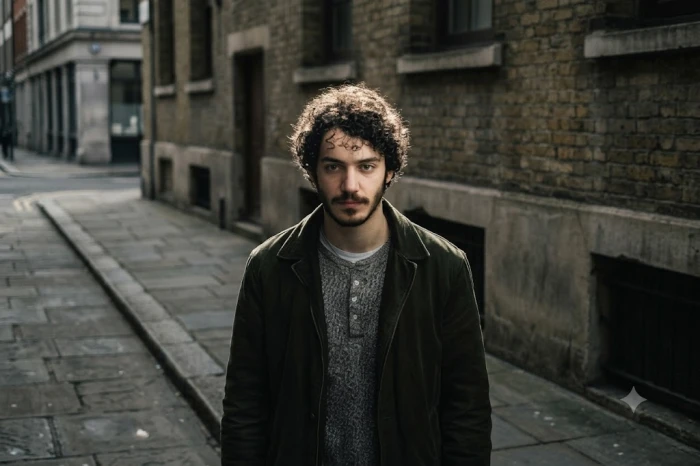 Gemini | 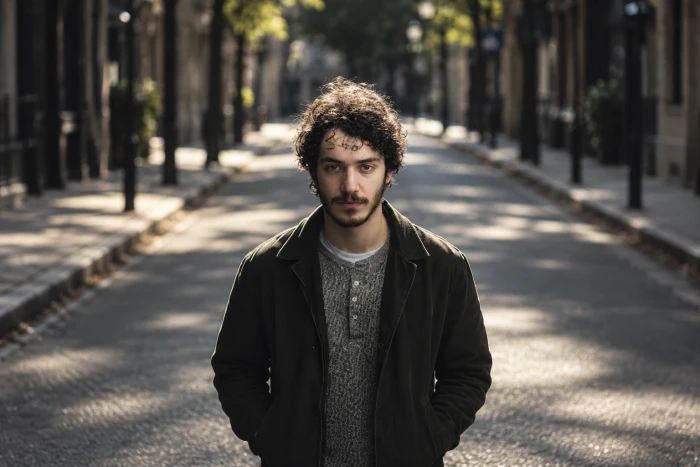 ChatGPT |
Selfie to professional headshot
What it tests: identity preservation, the hardest problem in AI photo editing, plus realistic studio lighting and skin texture. Best source photo: a casual, well-lit selfie with the face clearly visible.
| Prompt 2 |
| Turn this casual selfie into a professional LinkedIn headshot. Keep the person's face, skin tone, hairstyle, and facial features exactly the same so they are instantly recognizable. Change the outfit to a navy blazer over a plain white shirt, replace the background with a soft, out-of-focus light grey studio backdrop, and use soft, flattering studio light from the front left. Frame the shot from mid-chest up with the person looking at the camera, in a 4:5 portrait ratio. Keep natural skin texture with no plastic-looking smoothing. |
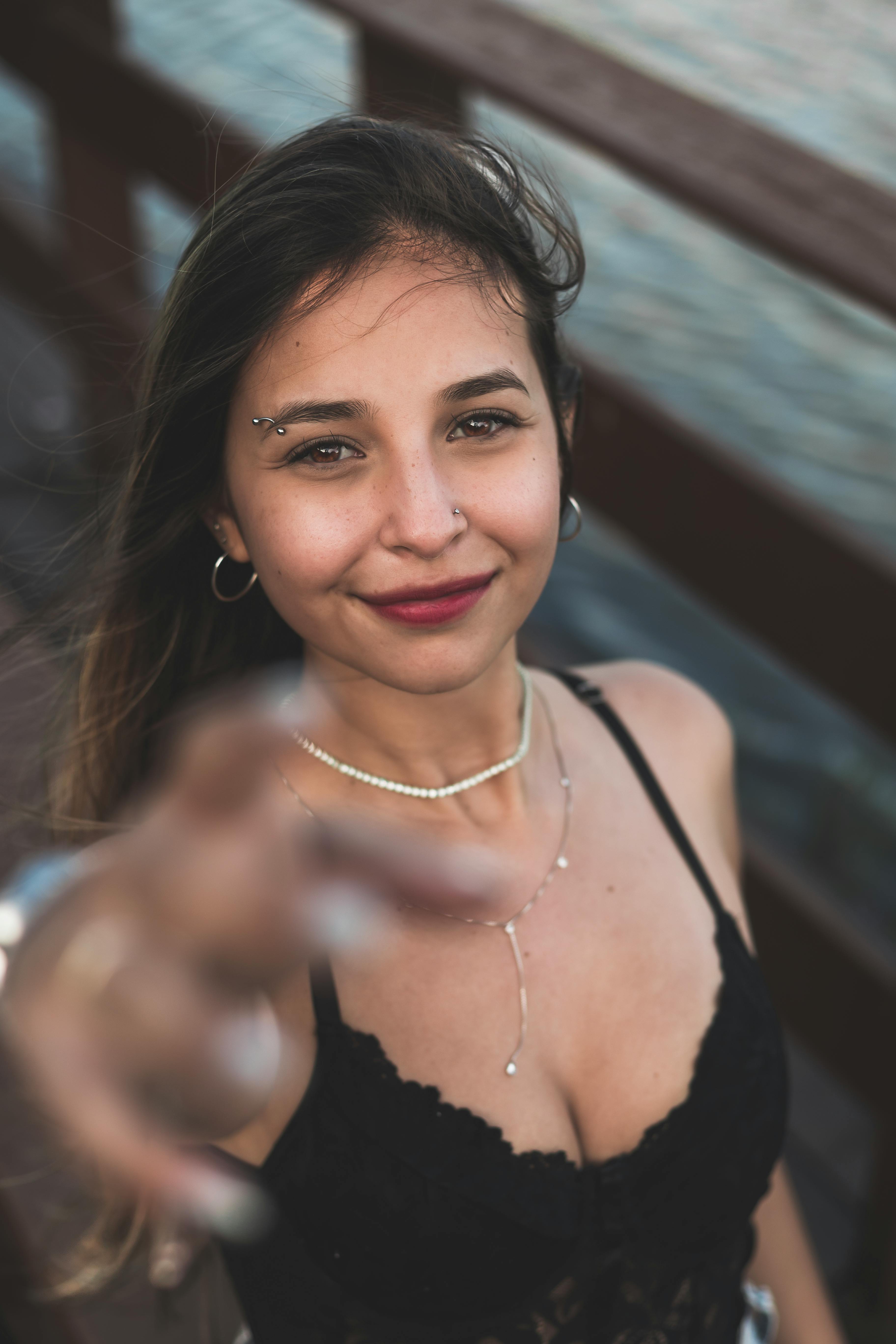
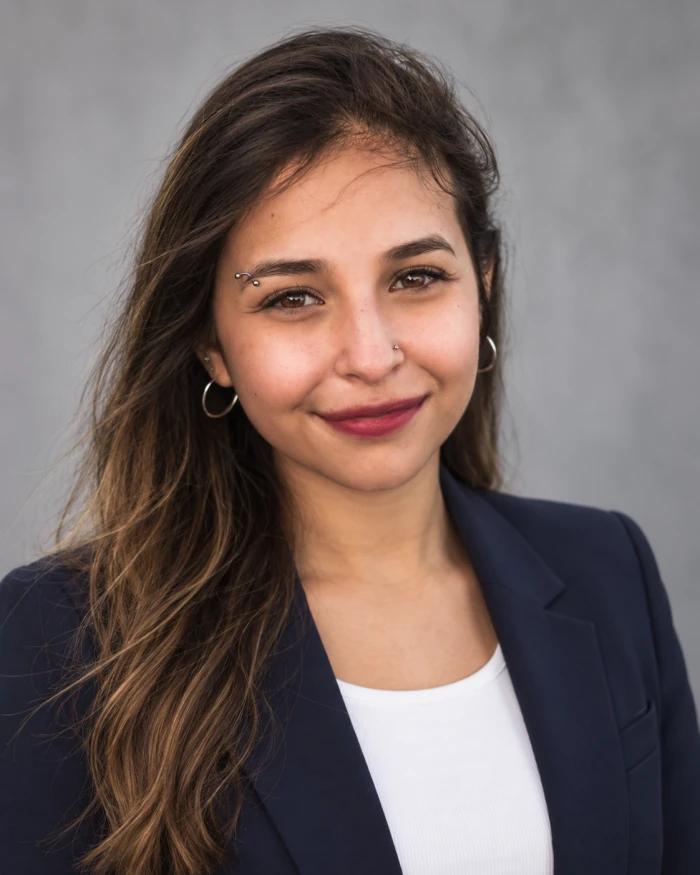 |  |
| ChatGPT | Gemini |
Restore and colorize an old photo
What it tests: damage repair and colorization without inventing new facial features, one of the most common reasons people try AI photo editing. Best source photo: a scanned black-and-white print with scratches, creases, or stains.
| Prompt 3 |
| Restore this old, damaged family photo. Remove the scratches, creases, dust spots, and stains, and repair any torn or missing edges. Gently sharpen the faces without changing anyone's features, age, or expression. Then colorize the photo with realistic, period-accurate colors for the 1960s: natural skin tones, muted fabric colors, and soft daylight. Keep the original composition, crop, and film grain. |
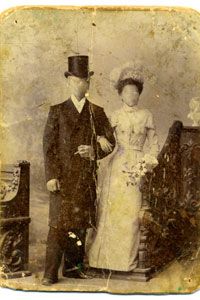
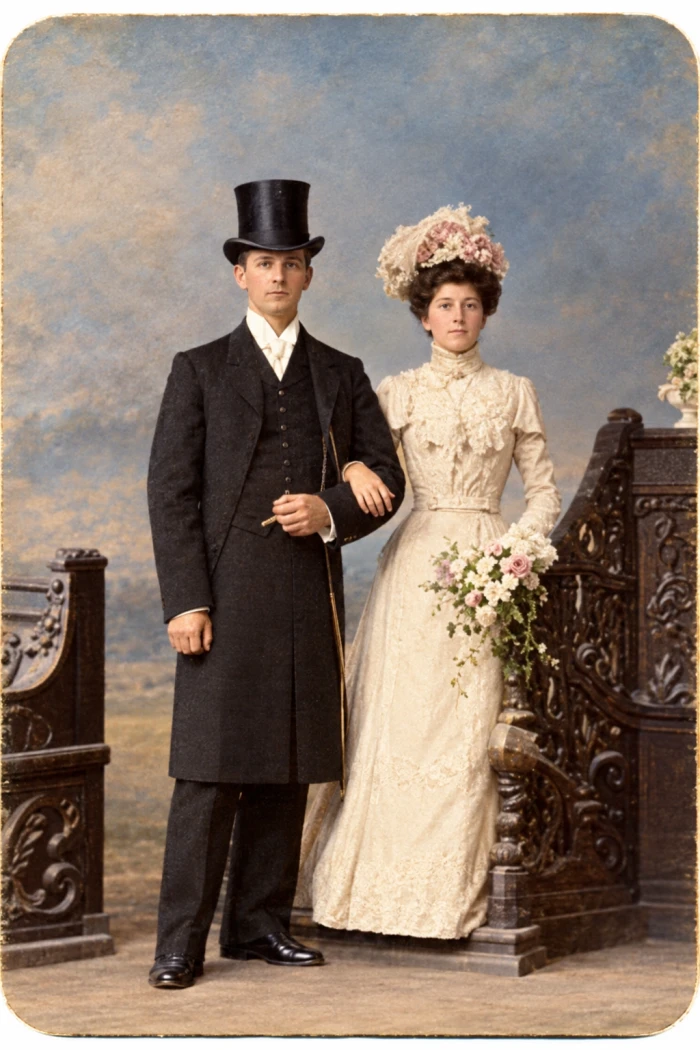 | 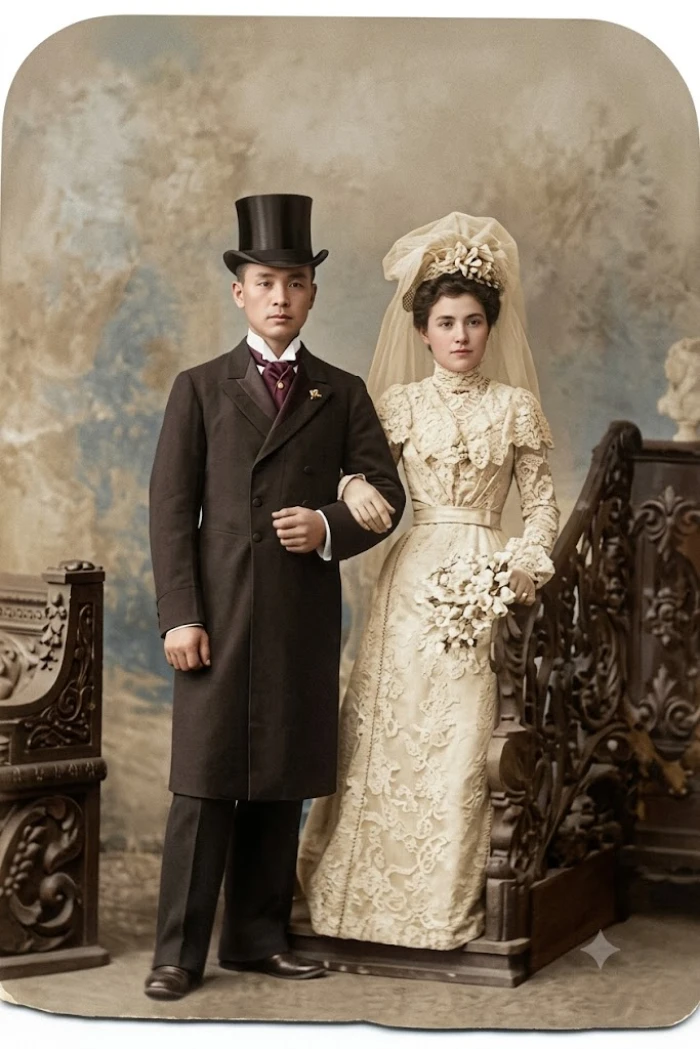 |
| ChatGPT | Gemini |
Product photo with ad text
What it tests: compositing a real product into a new scene, keeping its label legible, and rendering new text accurately. Best source photo: a plain phone photo of a bottle, jar, or box with a visible label.
| Prompt 4 |
| Place this product on a white marble kitchen counter next to a small bowl of fresh lemons, with soft morning sunlight coming from a window on the right and realistic shadows under the product. Keep the product's shape, label, logo, and colors exactly as they are in the original photo, with the label text fully legible. Add the headline "Fresh Every Morning" in a clean, modern sans-serif font at the top of the image, and "20% OFF This Week" in smaller text below it. Use a square 1:1 format suitable for an Instagram ad. |

 | 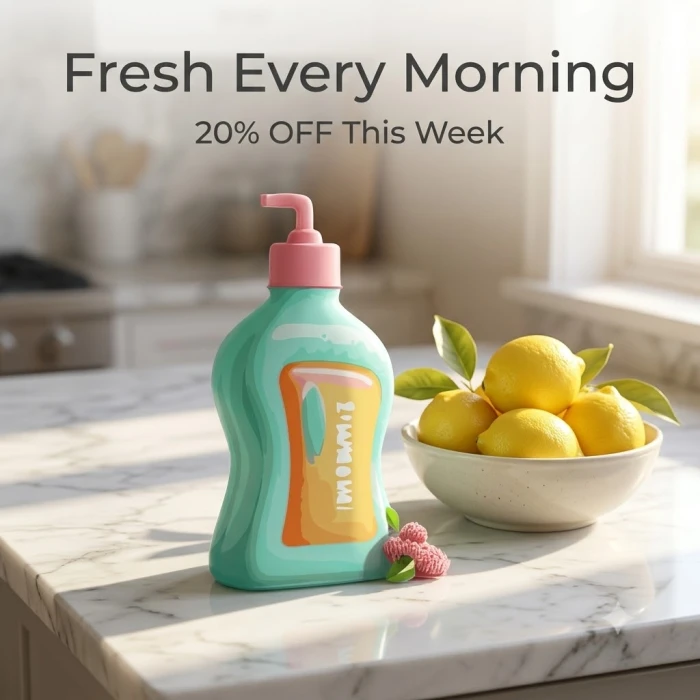 |
| ChatGPT | Gemini |
Which one should you use?
The data points to a clear split. Pick based on what you edit most often, not on which logo you like.
Choose ChatGPT ifYou need edits that change one thing and leave everything else alone, such as product shots, client work, or ad creative. You edit photos of real people and need them to stay recognizable over several rounds of changes. Your images include text, like posters, thumbnails, or labeled products. You already pay for ChatGPT Plus, so the best-ranked editor costs you nothing extra. | Choose Gemini ifYou edit casually and want the most free usage, or the cheapest paid plan at $4.99. You live in Android, Google Photos, and Google Search, where Nano Banana is already built in. You need real places, landmarks, or products rendered accurately, thanks to search grounding. You translate or localize text inside images, or you want to fire off quick drafts with the Lite model. |
Many people will get the best results by using both: rough out ideas quickly in Gemini, then finish the keeper in ChatGPT. Whichever you choose, run the four tests above on your own photos. Blind votes tell you what most people prefer; your own results tell you what works for you.
Discussion
No comments yet. Be the first to share your thoughts!