That is not a fantasy anymore. AI design tools have quietly turned everyday business owners into capable designers. The only skill you need now is knowing what to type. The prompt is the new paintbrush, and in this guide, you will see real prompts and the actual posters they produced, so you can copy the exact method.
Whether you are promoting a consulting firm, a skincare product, or a creative agency, this step-by-step workflow takes you from blank screen to print-ready poster, every single time.
Why AI Prompts Are a Game Changer for Business Posters
Hiring a designer is expensive. Learning design software takes months. AI prompts remove both roadblocks.
Here is what a good prompt unlocks:
- Speed: Generate complete poster concepts in seconds
- Savings: No designer fees, no stock photo subscriptions
- Consistency: Repeat the same style across every campaign
- Zero skill barrier: If you can describe it, you can design it
The catch? Vague prompts create vague posters. The difference between "meh" and "masterpiece" is the workflow below, and the three real examples that follow it.
The 6-Step Workflow for Jaw-Dropping AI Posters
Follow these steps in order. Skipping one is usually why posters come out looking generic.
Step 1: Define Your Poster's One Job
Before you type a single word, answer this: what is the one action you want the viewer to take?
Visit your website? Book a call? Buy a product? A poster trying to say five things says nothing. Write down:
- Your headline (7 words or fewer)
- Your offer or service details
- Your call to action
- Your brand colors and mood
This 2-minute brief becomes the raw material for your prompt.
Step 2: Pick Your AI Poster Tool
You do not need ten tools. You need one that fits your workflow. Three reliable options:
- Canva's AI Poster Generator turns a short text description into editable poster designs, perfect if you want drag-and-drop control after generation.
- Adobe Express AI Poster Maker goes straight from prompt to template and is designed to be commercially safe, which matters for business use.
- Microsoft Designer is a strong free option that transforms text prompts into polished, customizable visuals.
Pick one and stick with it for your first five posters. Familiarity beats features.
Step 3: Write a Prompt That Actually Works
This is where most people fail. "Make a business poster" gives the AI nothing to work with. Every winning prompt follows the same anatomy:
[Poster type] + [Industry and brand feel] + [Exact headline text] + [Color palette] + [Imagery description] + [Layout and typography rules] + [What to avoid] + [Format]
Notice that the prompt dictates the exact words on the poster, the exact colors, and even the aspect ratio. The AI cannot read your mind, but it can read your details. The three case studies below show this formula in action.
Step 4: Generate, Compare, Iterate
Never accept the first result. Treat generation like a conversation:
- Generate 3 to 4 variations from your prompt
- Pick the strongest layout
- Refine with follow-up prompts like "make the headline larger", "use more negative space", or "soften the lighting"
Small tweaks compound. Two or three rounds of iteration usually produce something that looks genuinely professional.
Step 5: Add the Human Touch
AI gets you 80% of the way. The final 20% is yours:
- Verify every word. AI text inside images can contain spelling slips, so proofread twice
- Swap in your real logo and exact brand hex codes
- Check the hierarchy: headline first, services second, call to action third
Step 6: Export for the Right Destination
- Print: PDF or PNG at 300 DPI
- Social media: JPG or PNG sized per platform, 4:5 vertical works beautifully for Instagram and LinkedIn feeds
- Digital screens: 1920x1080 landscape
3 Real Prompts and the Exact Posters They Created
Here is the part most blogs never show you: the full prompt next to the finished poster. Study these side by side and you will never write a weak prompt again.
Example 1: Corporate Consulting Poster (Navy and Gold)
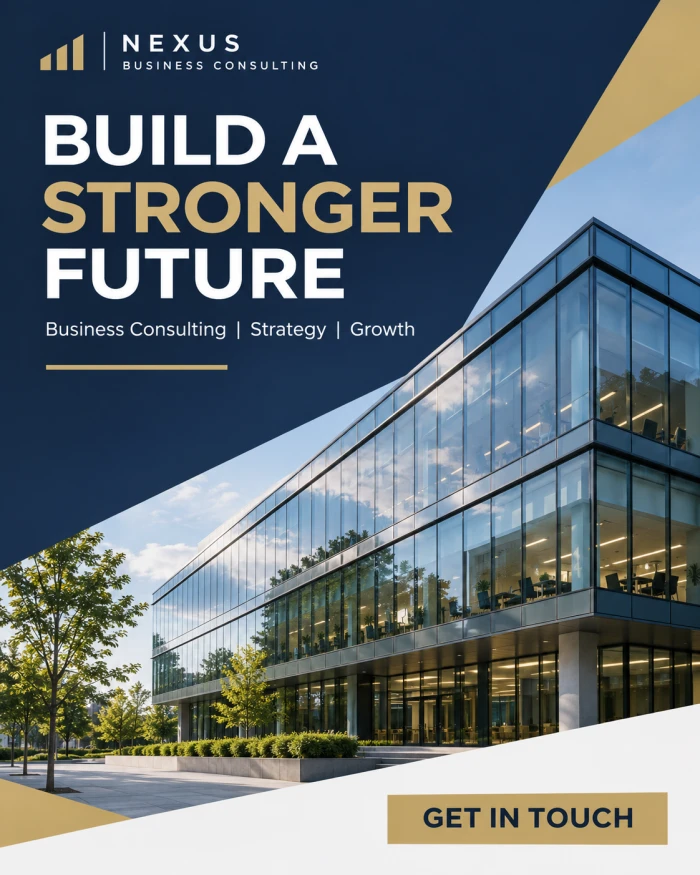
The exact prompt used:
"Create a professional corporate business poster for a modern business consulting company. Use a sophisticated navy blue, white, and muted gold color palette with a clean editorial layout. Feature a realistic photograph of a contemporary glass office building with elegant architectural lines and soft natural daylight. Place the bold headline 'BUILD A STRONGER FUTURE' in the upper-left section using modern sans-serif typography. Below it, include 'Business Consulting | Strategy | Growth' in smaller lettering. Add a refined gold accent line, subtle geometric shapes, generous negative space, and a clear 'GET IN TOUCH' call-to-action at the bottom. Make the poster look like a premium business agency advertisement, with precise alignment, crisp typography, realistic photographic detail, and no unnecessary decoration. Vertical 4:5 aspect ratio, print-ready composition."
Why this prompt wins:
- Named palette: Navy, white, and muted gold instantly signals "premium corporate"
- Specific imagery: "Glass office building with soft natural daylight" gives the AI a photographic brief, not a guess
- Placement instructions: "Upper-left section" and "at the bottom" control the layout like a real art director would
- Negative instruction: "No unnecessary decoration" prevents the cluttered look AI often defaults to
Example 2: Premium Skincare Product Poster (Warm and Botanical)

The exact prompt used:
"Design a premium product advertising poster for a modern skincare brand. Feature a realistic amber glass serum bottle standing on a polished beige stone pedestal, surrounded by delicate botanical leaves and soft natural shadows. Use warm cream, sage green, and earthy brown tones to create a sophisticated commercial aesthetic. Place the headline 'EVERYDAY SKINCARE, REFINED' across the upper section in elegant, perfectly aligned typography. Add the supporting phrase 'Thoughtfully Designed for Your Daily Routine' and a clean 'DISCOVER THE COLLECTION' call-to-action near the bottom. Use high-end studio product photography, realistic glass reflections, sharp product detailing, subtle background texture, and carefully balanced negative space. Avoid excessive graphic elements, artificial glow, and cluttered layouts. Create a realistic, publication-quality advertising poster in a vertical 4:5 format."
Why this prompt wins:
- Material language: "Amber glass", "polished beige stone pedestal", and "realistic glass reflections" push the AI toward true studio photography quality
- Mood through palette: Cream, sage, and earthy brown communicate calm luxury without ever saying the word "luxury" twice
- Triple avoid list: Banning artificial glow, excess graphics, and clutter is what keeps the result editorial instead of amateur
- Benchmark phrase: "Publication-quality advertising poster" sets the quality bar explicitly
Example 3: Digital Agency Poster (Bold and Energetic)

The exact prompt used:
"Generate a modern, visually striking business poster for a digital marketing and creative agency. Use a deep charcoal background with vibrant electric blue, orange, and soft purple accents. Feature a realistic creative workspace with a desktop monitor displaying abstract analytics charts, colorful design elements, and neatly arranged professional equipment. Introduce bold geometric shapes and subtle layered visual effects without overwhelming the composition. Display the headline 'IDEAS THAT DRIVE GROWTH' in large, clean white typography, followed by 'Branding | Digital Marketing | Creative Strategy.' Position a prominent but elegant 'LET'S WORK TOGETHER' call-to-action in the lower section. Use professional commercial photography, sharp realistic textures, strong visual hierarchy, restrained color contrast, and polished agency-style art direction. Ensure the typography is readable and correctly spelled. Vertical 4:5 poster composition with a high-resolution finish."
Why this prompt wins:
- Scene building: Describing the workspace, the monitor, the charts, and the equipment creates a rich, believable environment
- Energy with control: "Bold geometric shapes without overwhelming the composition" lets the design feel dynamic yet professional
- Smart safeguard: "Ensure the typography is readable and correctly spelled" directly targets AI's most common weakness
- Industry styling: "Agency-style art direction" tells the AI exactly whose portfolio to imitate
The Pattern Behind All Three Winning Prompts
Put the three prompts side by side and the same skeleton appears every time:
- Poster type and industry stated in the first sentence
- A locked color palette of 3 tones, never more
- One hero visual described in photographic detail
- Exact headline, subline, and CTA text in quotation marks
- Typography and layout rules (alignment, hierarchy, negative space)
- A clear avoid list to block clutter and fake effects
- Format specs at the end: vertical 4:5, print-ready, high resolution
Copy this skeleton, swap the details for your business, and you can produce an unlimited series of on-brand posters. That is consistency on demand.
Pro Tips That Instantly Level Up Your Results
- One idea per poster. Clutter kills conversions.
- Always quote your exact text. Putting the headline in quotation marks dramatically reduces spelling errors.
- Describe the mood, not just the look. Words like "sophisticated", "energetic", or "calm" steer the entire art direction.
- Save your winning prompts. A prompt library keeps every future campaign visually consistent. For fast experimentation, Microsoft's free AI Image Creator is great for testing prompt wording before committing to a full design.
- End with an avoid list. All three examples above ban clutter explicitly, and it shows in the results.
- Test at a distance. Zoom out to 25% and check if the headline still pops.
The Bottom Line
Professional poster design used to require talent, software, and a budget. Now it requires a well-written paragraph.
You have just seen three different industries, three different moods, and one identical prompt skeleton behind them all. Define the goal, lock the palette, describe the hero image, quote your text, set the rules, ban the clutter, and specify the format.
Your next great poster is one prompt away. Go type it.
Discussion
No comments yet. Be the first to share your thoughts!